

Table of Contents
- The Real Cost of Digital Productivity Guides
- Digital Productivity Tools vs Guides: Which Fits Your Workflow?
- Signs of a Low-Quality Productivity Course or Guide
- What Good Productivity Guide Templates Actually Include
- A Framework for Evaluating Digital Productivity Guides
- Signs You Are Over-Tooling Your Productivity System
- Conclusion
Last Updated: August 16, 2026
The Real Cost of Digital Productivity Guides
Most people asking whether digital productivity guides are worth the cost are already suspicious they've been burned before. They've downloaded a PDF, watched videos, and ended up back where they started: overwhelmed and slightly lighter in the wallet.
At Step-by-step Timesaver, we think that skepticism is healthy. The honest answer is: it depends entirely on what you're buying, and whether you can distinguish a well-designed system from a recycled blog post dressed up with a price tag.
Upfront Price vs. Hidden Maintenance Costs
The sticker price of a digital productivity guide rarely tells the full story. Many buyers focus on upfront cost while overlooking what it actually takes to implement and maintain the system being sold.
A guide requiring five separate apps, complex tagging, and thirty minutes weekly upkeep has a real cost beyond its purchase price. That ongoing time investment is the hidden maintenance cost, and it's one of the most underexamined factors in any productivity purchase.
Ask yourself: how much time will this system require each week just to keep running? A well-designed guide should reduce your cognitive load, not add to it. The best guides front-load the work and then become invisible, running in the background of your daily habits. Guides requiring constant tending are productivity liabilities.
The Psychological Cost of Subscription Fatigue
Subscription fatigue is a real drain on mental bandwidth. Many digital productivity products sold as one-time purchases are actually gateways into recurring payment ecosystems. You buy the guide, then need the companion app, then the premium tier, then the annual update.
This creates decision fatigue: not the productive kind from meaningful choices, but the draining kind from managing an ever-growing subscription list. According to research highlighted by Harvard Business Review on subscription overload, consumers consistently underestimate how many subscriptions they're actively paying for, and tracking them erodes the focus that productivity tools are supposed to protect.
A guide costing less upfront but triggering recurring subscriptions may cost more in both money and mental energy than a pricier, self-contained resource.
Digital Productivity Tools vs Guides: Which Fits Your Workflow?
Digital productivity tools and structured guides solve different problems. A tool is infrastructure, the container. A guide is the system you put inside it. Buying more tools without a clear system is like buying filing cabinets without a filing method.
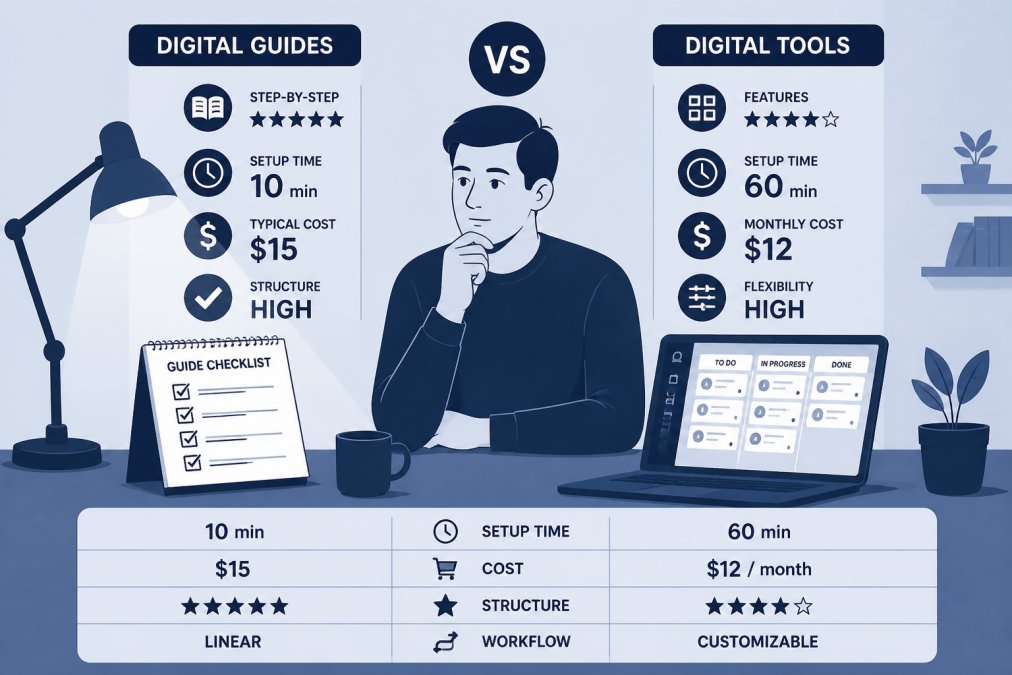
When Software Creates More Friction Than It Solves
The productivity paradox is real: sophisticated digital ecosystems consume time managing themselves rather than enabling work. Complex software creates friction at every interaction point. For professionals doing deep, focused work, this overhead is a net negative.
A printed checklist with clear sections often outperforms a feature-rich app for simple recurring tasks because it removes the decision layer entirely. You pick up the list and start.
Where Structured Guides Have the Advantage
A well-structured productivity guide provides what software cannot: methodology. It tells you not just where to put tasks, but how to think about prioritisation, batch similar work, and build habits reducing system management needs.
Structured guides also carry lower implementation costs than most software. There's no onboarding, integration setup, or configuration. You read, apply, and adjust. For busy professionals needing results now, that immediacy is a genuine advantage.
The strongest guides combine a clear personal knowledge management framework with actionable templates usable on day one.
Signs of a Low-Quality Productivity Course or Guide
Low-quality productivity courses typically fail in one of three ways: too generic to apply, too complex to implement, or too thin to justify the price.
Specific warning signs:
- No concrete templates or checklists. A guide describing concepts without ready-to-use tools is selling theory, not a system.
- Vague outcomes. Promises like "transform your productivity" without specifics signal soft content.
- Excessive tool recommendations. If a guide recommends five different apps, the system is the problem.
- No clear structure. Quality guides follow: diagnosis, framework, implementation, maintenance. Random blog post collections are not guides.
- No consideration of your starting point. Guides ignoring whether you're a beginner or experienced professional will be irrelevant to most buyers.
As Nielsen Norman Group's research on information overload shows, users abandon content that doesn't deliver clear value within the first few interactions.
What Good Productivity Guide Templates Actually Include
Good productivity guide templates are operational documents with a clear job to do, not collections of motivational frameworks.
A well-designed template typically includes:
- A diagnostic section identifying your specific bottlenecks before prescribing solutions
- A prioritisation framework with explicit criteria, not just "urgent vs. important"
- Daily and weekly planning pages formatted for quick completion (under five minutes)
- A habit tracker tied directly to core recommendations
- A review protocol specifying exactly when and how to assess whether the system works
- Troubleshooting notes for common implementation failures

The distinction between template and worksheet matters. A template is reusable and adaptable. A worksheet is one-time. Many guides sold as "complete systems" are actually worksheet collections with no repeatable structure.
Step-by-step Timesaver's PDF guides provide clear, reusable templates with actionable steps you can apply immediately, not one-time exercises requiring weekly rebuilding.
A Framework for Evaluating Digital Productivity Guides
Before spending money on any guide, run it through this four-part evaluation:
| Evaluation Criteria | What to Look For | Red Flag |
|---|---|---|
| Clarity of outcome | Specific, measurable result promised | Vague transformation language |
| Implementation cost | Setup time under 2 hours | Requires multiple new tools |
| Template quality | Reusable, pre-formatted templates included | Worksheets only, no repeatable structure |
| Maintenance demand | System runs with minimal weekly upkeep | Requires daily system management |
Price tells you very little about quality. A free guide built around a single clear methodology outperforms an expensive course with loosely related modules.
The Free vs. Paid Quality Gap
Free content tends to be broad by design, appealing to the widest audience but rarely going deep enough to be genuinely useful. Paid guides, at their best, offer tighter scope, more detailed templates, and clearer implementation paths.
Ask not "is this free or paid?" but "is this specific enough to apply to my situation?" A paid guide covering task management for everyone is less valuable than a free checklist designed for your exact workflow.
Production quality matters. Well-designed, clearly formatted, logically sequenced guides save time in themselves. Poor formatting creates cognitive load before you've started.
How to Calculate Your Return on Investment
Calculating ROI for a productivity guide requires honest accounting on both sides.
The cost side:
- Purchase price
- Implementation time (multiply initial estimate by 1.5)
- Any additional tool subscriptions triggered
The return side:
- Hours saved per week once running
- Reduction in decision fatigue and context-switching
- Improved output quality from better prioritisation
If a guide costs four hours to implement and saves two hours weekly, it pays back within two weeks. If it costs eight hours and saves thirty minutes weekly, you're looking at a four-month payback, and most people abandon systems before reaching that point.
According to McKinsey's research on knowledge worker productivity, knowledge workers spend significant time on coordination rather than core work. A guide addressing this friction generates faster returns than generic time management.
Signs You Are Over-Tooling Your Productivity System
Over-tooling is the productivity equivalent of buying gym equipment you never use. The purchase feels like progress. It isn't.
Signs your system has too many moving parts:
- You spend time each week maintaining the system rather than working within it
- You have more than three apps open simultaneously for task management
- You've forgotten what some subscriptions actually do
- You feel anxious missing system updates or weekly reviews
- You've bought multiple guides on the same topic without finishing any
Tool sprawl and guide accumulation stem from the same issue: buying feels like action. The purchase creates temporary progress that masks absent implementation.
Software bloat in personal productivity systems is as damaging as in enterprise software. Every additional app creates failure points, learning curves, and subscriptions to manage. The most effective systems used by experienced professionals are almost always simpler than expected.
Any good guide reduces daily decisions, not adds them. If your current system requires ten decisions before starting work, it works against you.
For professionals reaching this point, the answer is rarely another tool. It's a structured, opinionated guide telling you exactly what to cut, keep, and how to build a system simple enough to maintain under pressure. That's the real value of quality productivity guides, and what Step-by-step Timesaver's library delivers.
Productivity systems fail not because people lack discipline, but because systems themselves are too complex to sustain. If your current approach to task management, time tracking, and workflow optimisation creates more stress than relief, the problem is the system, not you. Step-by-step Timesaver offers clear, actionable PDF guides built for immediate implementation, covering everything from daily planning to project management, without the bloat. Explore the guide library and find the shortcut that actually fits your workflow.
Frequently Asked Questions
Do digital productivity guides actually save time?
A well-structured guide saves time by removing the trial-and-error phase. Instead of spending hours researching a workflow from scratch, you follow a tested sequence of steps. The time savings depend on how closely the guide matches your specific situation. Guides built around actionable templates and clear decision points tend to deliver faster results than broad, theory-heavy courses. If you can apply one section immediately, the guide has already paid for itself in hours recovered.
Are paid productivity courses better than free YouTube tutorials?
Free tutorials cover individual tactics well, but they rarely give you a complete, sequenced system. Paid guides and courses typically offer structured progression, downloadable templates, and a single coherent framework rather than a collection of unrelated tips. The real gap is not information volume but organisation. A paid guide that saves you two hours of piecing together scattered advice is worth the cost. The question to ask is whether the paid option gives you a ready-to-use system or just more content to sift through.
How do I know if a productivity guide is high quality?
Look for four things: a clear outcome stated upfront, actionable steps rather than abstract advice, templates or tools you can use immediately, and evidence the content was built for your specific situation. Low-quality guides tend to recycle generic advice, lack real examples, and pad word count with motivational filler. A strong guide tells you exactly what you will be able to do differently after completing it, and the structure makes that progression obvious from the first section.
How do I avoid information overload when buying productivity resources?
Buy one guide at a time and finish it before purchasing another. Before buying, check whether the guide has a clear scope: a narrow, well-defined topic covered thoroughly beats a broad overview that skims everything. Avoid bundles unless you have a specific use for each item. If a guide does not have a logical sequence from start to finish, it will add to your cognitive load rather than reduce it. Treat each purchase as a commitment to act, not just to read.
This article was written using GrandRanker